← Back to Projects
Movie Actor Collaboration Network.
Exploring how actors are connected through shared film collaborations.
- Role
- Python Developer and Data Analyst
- Course
- SI 507 — Intermediate Programming
- Timeline
- January – April 2026
- Team
- Team of one
- Tools
- Python, pandas, NetworkX, Streamlit, pytest, TMDB data
Interactive Application
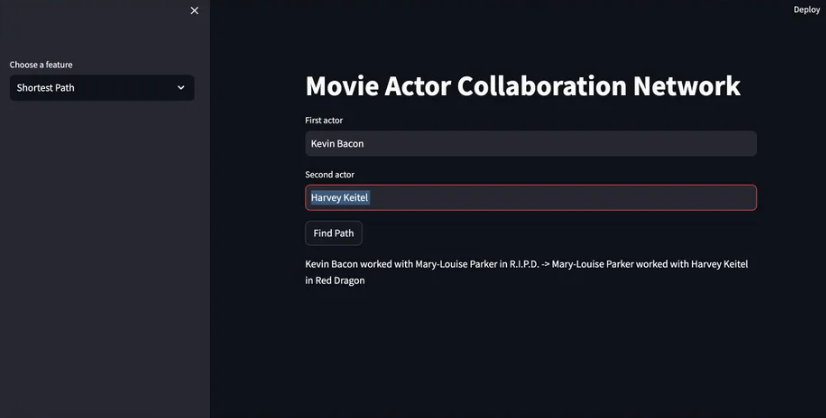
Explore shared films and discover the shortest collaboration path between actors.
Actor
Film
Actor
Actor
Project Overview
Background
Movies are created through large networks of actors who repeatedly collaborate across different productions. However, a standard movie table does not clearly show how individual actors are connected or how collaboration patterns extend across films.
This project uses graph analysis to make those relationships visible. In the network, each actor is represented as a node, and an edge connects two actors when they appeared in the same movie.
Problem Statement
Design Challenge
Movie datasets commonly organize information by title, release date, popularity, and cast list. While this format is useful for looking up individual movies, it does not make it easy to explore relationships between actors.
How might I transform movie and cast data into an interactive network that helps users explore actor relationships, shared movies, collaboration paths, and influential performers?
Project Goal
What the app supports
- Search for actors by name
- View an actor's movies and number of collaborators
- Find the shortest collaboration path between two actors
- Discover movies shared by two actors
- Rank actors by unique collaborators
- View a summary of the overall network
Dataset
TMDB 5000 Movie Dataset
The project uses two CSV files from the TMDB 5000 Movie Dataset: movie metadata and movie credits with cast information. The files include movie identifiers, titles, release dates, popularity values, vote averages, cast members, and crew information.
- Loaded movie and credits CSV files with pandas
- Joined datasets using the movie identifier
- Parsed cast information stored as text-based lists
- Extracted top-billed cast members for each movie
- Created actor nodes and collaboration edges
- Used the first eight cast members by default to keep the graph meaningful and manageable
Network Structure
How the graph works
Movies processed4,800
Actors15,196
Collaboration edges121,510
Connected components201
Nodes
Each node represents an actor.
Edges
An edge connects two actors who appeared in the same movie. Each edge stores shared movie titles and a weight representing how many movies the actors made together.
My Role
Independent design and development
- Defining the network model
- Cleaning and merging movie data
- Designing the object-oriented architecture
- Building graph-search functions
- Developing the Streamlit interface
- Writing automated tests
- Handling missing and invalid data
- Creating user-friendly interaction options
Process
How I transformed movie metadata into an interactive actor network.
01Define the problem
I identified actor collaboration as a relationship that could be better understood through a graph rather than a traditional table.
Prepare the data
I loaded and merged the TMDB movie and credit files, parsed cast records, removed duplicate actor names within each film, and handled empty or invalid values.
Model the network
I represented actors as nodes and their shared movie appearances as weighted edges.
Build the algorithms
I created functions for actor search, shared-movie lookup, rankings, actor details, network summaries, and shortest-path analysis.
Design the interface
I transformed the command-line functionality into a Streamlit application with sidebar navigation and separate views for each feature.
Test the system
I wrote automated tests to verify graph construction, search, actor details, path finding, rankings, invalid input handling, CSV loading, and network summaries.
Final delivery
I completed the Python network model, Streamlit application, test suite, and project documentation.
Object-Oriented Design
Core system structure
Movie
Stores movie ID, title, release date, vote average, popularity, and cast members. The class also derives the release year from the release date.
Actor
Stores actor name, movie titles, unique collaborators, movie count, and collaborator count.
MovieActorNetwork
Manages the NetworkX graph, actor and movie objects, data loading, search, rankings, shared movies, collaboration paths, and network statistics.
Movie data + Credits data
Data preparation
MovieActorNetwork class
Actor objects + Movie objects
NetworkX graph
Core Application Features
What users can explore
Search actors
Users can enter part of an actor's name and receive matching results. Search normalizes capitalization and extra spacing.
Actor details
Users can view an actor's movie count, unique collaborator count, film titles, and collaborator names.
Shortest collaboration path
NetworkX determines how two actors are indirectly connected through other performers and shared films.
Most connected actors
The program ranks actors by the number of unique performers with whom they collaborated.
Shared movies
Users can enter two actors and identify the movies in which they appeared together.
Network summary
The application reports total actors, collaboration edges, movies, and connected components.
Most Connected Actors
Leading collaboration counts
Robert De Niro329
Samuel L. Jackson313
Morgan Freeman266
Bruce Willis261
Nicolas Cage245
A careful interpretation is that high connectivity may reflect a combination of career longevity, number of films, ensemble casts, and the dataset's coverage, not necessarily artistic influence by itself.
Testing
System validation
I wrote automated tests to verify graph construction, search, actor details, path finding, rankings, invalid input handling, CSV loading, and network summaries.
Reflection
What I learned
This project helped me connect programming fundamentals with analytical thinking by turning relationship data into a useful exploration tool.
Behind the Project
Explore the build
Curious how the network comes together? Visit the GitHub repository to explore the source code, data workflow, automated tests, and documentation behind the interactive experience.
Next Project →SkillBridge